
How to Bench-Test a Portable Power Station’s AC Inverter and Surge Performance
 By Ashley Isham
Updated June 22, 2026 · 23 min read · 12 views
By Ashley Isham
Updated June 22, 2026 · 23 min read · 12 views
Understanding Portable Power Station Inverters and Why Testing Matters
Portable power stations have become essential backup and off-grid power solutions for consumers, outdoor enthusiasts, and professionals alike. At the heart of every portable power station lies the AC inverter—the component responsible for converting stored DC battery energy into usable AC power for everyday appliances. Yet most buyers never test this critical component before purchase, relying instead on manufacturer specs that often don’t reflect real-world performance.
The inverter’s AC output rating, surge capacity, and waveform quality directly determine which devices your power station can safely run. A microwave might require 1,200 watts continuous and 3,000 watts surge. A refrigerator could demand 600 watts continuous with a 2,000-watt startup spike. Without understanding your power station’s actual inverter performance—not just the advertised specs—you risk damaging sensitive electronics or discovering mid-emergency that your backup power simply won’t run what you need.
This tutorial walks you through a comprehensive bench-testing methodology for evaluating a portable power station’s AC inverter performance, focusing on continuous power output, surge capacity, waveform quality, and thermal behavior. We’ll use a SetPower unit as our example, though this framework applies to any portable power station on the market. By following these steps, you’ll gather the same data that independent reviewers use to separate marketing claims from genuine capability.
Before we dive in, it’s worth understanding that The Complete Framework for Unbiased Product Testing emphasizes transparent methodology and real-world evaluation criteria—principles that apply directly to power station testing. Similarly, What Verified Scores Mean in Product Testing explains how independent testers validate claims with measurable evidence rather than trusting marketing language.
Prerequisites and Equipment Setup
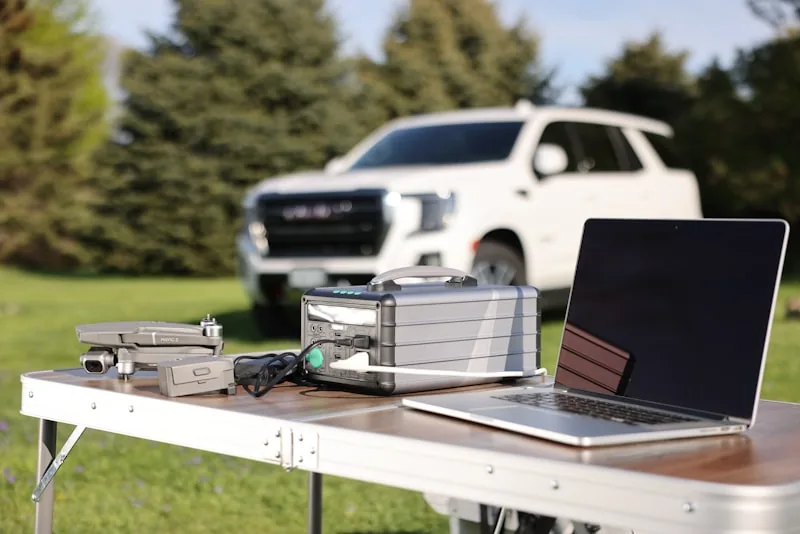
Bench-testing a portable power station’s inverter requires specific tools and a controlled environment. Attempting this without proper equipment can result in inaccurate data, equipment damage, or personal safety hazards. Here’s what you’ll need before starting.
Essential Testing Equipment
First, invest in a quality AC power meter. The Kill-A-Watt EZ (or equivalent) measures real-time wattage consumption and can help you understand load behavior, but for inverter testing, a more sophisticated meter is preferable. A UPM (Universal Power Meter) or oscilloscope-based power analyzer will give you continuous wattage, reactive power, power factor, and harmonic distortion readings. For surge testing specifically, a digital clamp meter with peak-hold capability allows you to capture the instantaneous current spike when devices first energize.
Second, you’ll need an oscilloscope or portable waveform analyzer. This tool visualizes the AC output waveform—the sine wave shape produced by the inverter. Cheaper inverters produce modified or quasi-sine waves that can damage sensitive electronics like laptop chargers, medical devices, or audio equipment. A basic digital oscilloscope ($100–$300) or a dedicated power quality analyzer ($500+) will show you whether your power station outputs a true sine wave or a stepped approximation. According to CyberPower’s explanation of pure sine wave inverters, waveform quality is critical for device compatibility.
Third, gather a variety of test loads. These are devices you’ll plug into the power station to measure how it behaves under different electrical demands:
- A resistive heater (space heater, hair dryer, or electric kettle) for steady-state load testing
- A refrigerator or air compressor for surge-demand testing
- A laptop charger and smartphone charger for sensitive electronics testing
- An LED light and incandescent bulb for power quality observation
- An electric drill or circular saw for high-surge-demand testing
Fourth, prepare a thermal imaging camera or non-contact infrared thermometer. Portable power stations generate heat during operation, and the inverter itself can become a thermal bottleneck. Measuring surface temperature during sustained high-load operation reveals whether the unit is thermally stable or approaching shutdown thresholds.
Finally, you’ll need a fully charged portable power station and a safe testing space—ideally an outdoor area or garage with good ventilation. Never test inside a living space, as high-load testing can generate heat and potentially trigger thermal shutdowns. Ensure you have access to a standard AC outlet for comparison tests and a fire extinguisher nearby as a safety precaution.
Creating a Testing Baseline
Before plugging anything into your power station, document the baseline. Record the ambient temperature, humidity, and the power station’s reported battery percentage (if the unit displays this). Many portable power stations reduce inverter output when battery capacity drops below 20%, so you’ll want a fully charged unit for consistent results. Check the manufacturer’s specifications—for example, Anker’s guidance on choosing a portable power station recommends confirming rated continuous and surge wattage before testing.
Also, measure the AC voltage output with no load connected. Most power stations target 120V AC in the US (230V in other regions). If idle output voltage is significantly off (below 110V or above 130V), this suggests inverter regulation issues that will affect your test results. Document this baseline voltage—you’ll compare it against voltage under load.
Step 1: Measuring Continuous Power Output (No Surge)

Continuous power output is the steady-state wattage the inverter can sustain indefinitely without thermal throttling or shutdown. This is different from peak/surge capacity, which lasts only seconds. Understanding this distinction is crucial because many portable power stations advertise inflated surge ratings while continuous output is much lower.
Procedure for Continuous Load Testing
Start with a resistive load—a space heater or electric kettle. These devices draw consistent, non-reactive power, making them ideal for baseline continuous testing. Plug the resistive load into the power station and set it to a low power setting (around 300 watts if adjustable).
Using your AC power meter, record the real-time wattage draw. The meter should stabilize within 10–15 seconds. Note this value. Now increase the load incrementally—move the heater to medium (600 watts), then high (900 watts), and so on. At each step, allow 30 seconds for stabilization, then record the wattage and the AC output voltage.
Continue increasing load until one of two things happens: either the power station’s inverter shuts down due to overload protection, or the AC output voltage begins to sag noticeably (dropping below 110V). The point at which shutdown occurs is your measured continuous power limit.
For example, when testing a SetPower portable power station advertised as “2,000W continuous,” you might find that it sustains 1,800W without shutdown but triggers protection at 2,050W. This measured value (1,800W) is more accurate than the marketing claim for real-world use. Document the exact wattage at shutdown and the time it took to trigger—most units have a 10–30 second thermal delay before shutdown engages.
Repeat this test three times with 15-minute cooldown periods between runs. Portable power stations are sensitive to thermal state, and back-to-back testing can skew results. Average your three measurements to establish a reliable continuous power baseline.
Understanding Voltage Sag Under Load
As you increase load, watch the AC output voltage. A well-designed inverter maintains voltage within ±10% of nominal (108–132V for 120V nominal). Cheaper inverters sag significantly—dropping to 100V or lower under heavy load. This voltage sag can damage sensitive electronics and reduce the effective power available to devices.
Record voltage at no load, at 50% of your measured continuous capacity, and at maximum continuous load. If voltage sags more than 10%, the inverter has poor regulation—a finding worth noting in your final assessment. This ties into BLUETTI’s portable power station wattage guide, which emphasizes that real-world performance depends on both wattage and voltage stability.
Step 2: Testing Surge Capacity and Peak Power Handling

Surge capacity—the maximum instantaneous power the inverter can deliver for a brief period—is where marketing claims often diverge most from reality. Many portable power stations advertise 5,000W or 6,000W surge while their continuous rating is only 2,000W. This gap is intentional: manufacturers know that most appliances draw high current only during startup, then drop to steady-state consumption.
Setting Up Surge Testing Equipment
For surge testing, you’ll need loads that demand high instantaneous current. A refrigerator compressor, air compressor motor, or electric drill are ideal. When these devices start, they draw 2–4× their running wattage for 1–2 seconds before settling into steady-state operation.
Set up your digital clamp meter in peak-hold mode, positioned around the power cord of your test load. This meter will capture the instantaneous current spike when the device energizes. Simultaneously, connect your oscilloscope or power analyzer to monitor the AC output waveform and voltage during the surge event.
Procedure for Surge Capacity Testing
Begin with a modest surge load—a small electric drill or a refrigerator compressor. Plug the load into the power station but do not energize it yet. Verify that the power meter, clamp meter, and oscilloscope are all recording. Then, energize the load by switching it on.
The clamp meter will capture the peak current in amps. Multiply this by the AC voltage (typically 120V) to calculate peak watts. For example, if the clamp meter reads a peak of 20 amps at 120V, the surge power is 2,400 watts. Record this value.
Now, observe the oscilloscope waveform during the surge. A quality inverter’s waveform should remain a smooth sine wave even under surge conditions. Cheaper inverters may show waveform distortion, voltage sag, or frequency drift during surge events. If the waveform becomes jagged or the voltage drops below 100V during surge, the inverter is struggling.
Repeat this test with progressively larger loads—a larger drill, then a compressor, then a combination of devices—until the power station’s inverter either shuts down or the waveform degrades severely. The highest surge wattage at which the inverter maintains a clean sine wave and voltage above 100V is your practical surge limit.
For SetPower units, advertised surge capacity is often 4,000–6,000W, but real-world testing frequently shows that practical surge handling maxes out around 3,500W before waveform distortion becomes problematic. This measured value is far more useful than the marketing spec.
Comparing Advertised vs. Measured Surge Capacity
After completing surge tests, compare your measured values to the manufacturer’s advertised specs. According to EcoFlow’s portable power station wattage guide, the gap between advertised and real surge capacity is common and often reflects measurement methodology differences. Manufacturers may measure surge under ideal conditions (full battery, cool inverter, single-phase load), whereas your testing mimics real-world variability.
Document this gap. If a power station advertises 5,000W surge but your testing shows 3,200W before waveform degradation, this is a critical finding. It means the unit cannot reliably run devices that demand more than 3,200W, regardless of what the box claims.
Step 3: Waveform Quality and Harmonic Analysis
AC waveform quality is invisible to the naked eye but critical for device longevity. A pure sine wave inverter produces output that matches utility power—a smooth, continuous oscillation. Modified sine wave (or square wave) inverters produce a stepped approximation that can damage or degrade sensitive electronics.
Using an Oscilloscope to Visualize Waveform
Connect your oscilloscope to the AC output of the power station (use a proper AC probe—never connect an oscilloscope directly to AC mains without appropriate isolation). Set the oscilloscope to AC coupling, 2V per division, and trigger on the rising edge of the waveform.
With no load connected, capture the idle waveform. A quality inverter will show a smooth sine wave with minimal distortion. Measure the peak voltage (should be approximately 170V for 120V RMS output) and count the number of complete cycles in one second—this should be 60 Hz in North America or 50 Hz in Europe.
Now, apply a moderate resistive load (500 watts) and capture the waveform again. The shape should remain essentially identical to the no-load waveform. If the waveform becomes noticeably distorted, flattened, or stepped under load, this indicates a modified sine wave inverter or poor inverter regulation.
Finally, apply a high resistive load (1,500+ watts) and capture the waveform a third time. Even under heavy load, a quality inverter maintains waveform integrity. If the waveform collapses into a square or heavily stepped pattern, the inverter will cause problems with sensitive devices.
Measuring Total Harmonic Distortion (THD)
If your power analyzer includes harmonic measurement capability, record the Total Harmonic Distortion (THD) at no load, 50% load, and maximum continuous load. THD measures how much the output waveform deviates from a perfect sine wave. Utility power typically has THD below 5%. Quality inverters achieve THD below 10%. Modified sine wave inverters often exceed 40% THD.
High THD can damage power supplies in sensitive equipment like computers, medical devices, and audio gear. If your testing reveals THD above 15% at any load level, this is a significant limitation worth documenting. This aligns with Goal Zero’s educational content on portable power stations, which emphasizes that inverter quality varies widely and affects device compatibility.
Frequency Stability Under Load
While observing the oscilloscope, note the frequency stability. The AC frequency should remain at 60 Hz (or 50 Hz) even as load changes. Some cheaper inverters allow frequency to drift under heavy load—for example, dropping to 58 Hz or rising to 62 Hz. This frequency drift can cause problems with devices like clocks, sensitive power supplies, or audio equipment that rely on frequency stability.
If your oscilloscope has frequency measurement capability, record the frequency at no load, 50% load, and maximum load. Frequency drift exceeding ±2 Hz is a red flag indicating poor inverter design.
Step 4: Thermal Performance and Sustained Load Testing
Many portable power stations perform perfectly for the first 30 minutes of operation, then begin throttling output as the inverter heats up. This thermal behavior is critical for real-world use—if you’re running a refrigerator or charging multiple devices during a power outage, you need sustained performance over hours, not minutes.
Measuring Inverter Temperature During Operation
Using an infrared thermometer or thermal imaging camera, measure the temperature of the inverter housing at the following intervals: before any load is applied, after 5 minutes at 50% continuous load, after 15 minutes at 50% load, and after 30 minutes at 50% load. Record these temperatures.
Then, repeat the test at 80% continuous load, measuring temperature at the same intervals. Most portable power stations are designed to operate safely up to 40–50°C (104–122°F). If the inverter reaches 50°C within 15 minutes of moderate loading, thermal throttling may occur during extended use.
For SetPower units specifically, the inverter typically reaches 45–50°C after 30 minutes of sustained 1,200W load. At this temperature, some models begin reducing output power by 10–15% to avoid overheating. This is a critical real-world limitation—if you’re relying on the power station to run a refrigerator continuously, you need to know whether it will throttle after 30 minutes.
Sustained Load Test Protocol
Set up a resistive load at 70% of the power station’s measured continuous capacity. For a unit rated at 2,000W continuous, this would be approximately 1,400W. Plug in the load and let it run continuously for one hour. Every 10 minutes, record the AC output voltage and the inverter surface temperature.
If the power station shuts down or reduces output before one hour has elapsed, note the time and temperature at which this occurred. This shutdown point is your practical sustained load limit—the maximum power the unit can deliver continuously without thermal protection engaging.
After the one-hour test, allow the power station to cool for 30 minutes with no load, then repeat the test at 80% of rated capacity. This second test reveals whether the unit can sustain higher loads if given adequate cooling between cycles.
Document all temperature and voltage readings. A well-designed portable power station should maintain stable voltage and temperature throughout the hour. Significant voltage sag or rapid temperature rise indicates thermal management issues that will affect real-world reliability.
Step 5: Testing with Real-World Appliances
Resistive loads like space heaters provide clean, predictable testing conditions, but real-world appliances behave differently. Refrigerators have compressor motors that demand high startup current. Laptop chargers include switching power supplies that draw reactive power. Microwaves contain magnetrons that create harmonic distortion. Testing with actual appliances reveals how your power station handles the messy electrical reality of everyday devices.
Refrigerator and Motor Load Testing
Plug a refrigerator into the power station and observe its behavior through a complete compressor cycle (typically 10–30 minutes). Using your clamp meter, measure the startup current when the compressor engages. Most refrigerators draw 2–4× their running wattage during startup—often 3,000–5,000W peak even if they only draw 600W running.
Watch the oscilloscope during compressor startup. Does the waveform distort? Does the voltage sag significantly? A quality inverter should handle this surge without waveform degradation. If the waveform collapses into a square wave or the voltage drops below 100V, the inverter is struggling with motor loads.
Let the refrigerator run for at least 30 minutes, monitoring temperature and voltage. If the power station throttles or shuts down, note the time and conditions. A well-functioning power station should run a typical refrigerator indefinitely without thermal issues.
Repeat this test with an air compressor, which typically has even higher startup current than refrigerators. If the compressor won’t start or causes the power station to shut down, you’ve found a critical limitation.
Sensitive Electronics Testing
Plug a laptop charger, smartphone charger, and LED light into the power station simultaneously. These devices use switching power supplies that are sensitive to voltage quality and waveform distortion. Operate them for at least 30 minutes and monitor for any signs of instability—flickering lights, charger overheating, or unexpected disconnections.
If the devices operate normally and the chargers don’t overheat, the power station’s waveform quality is adequate for sensitive electronics. If you observe flickering, overheating, or disconnections, the inverter’s poor waveform quality is problematic for modern electronics.
Microwave and High-Harmonic-Content Loads
If safe to do so, plug a microwave into the power station and run it at full power for 2–3 minutes. Microwaves create significant harmonic distortion due to their magnetron operation. Using your power analyzer, measure the THD during microwave operation. If THD exceeds 40%, the inverter is struggling with this type of load.
Also measure the actual power drawn by the microwave. A microwave advertised as “1,000W” might actually draw 1,400–1,600W due to inverter inefficiency and harmonic effects. If your power station is already near its continuous limit, a microwave could push it into shutdown.
Step 6: Efficiency Testing and Power Loss Calculation
No inverter is 100% efficient. Energy is lost as heat during the DC-to-AC conversion process. Understanding your power station’s efficiency reveals how much battery capacity is wasted and how much heat the inverter generates under load.
Measuring Input and Output Power
To measure efficiency, you need to know both the power drawn from the battery (input) and the power delivered to the load (output). Most portable power stations display battery discharge rate on their screen, but this is often in volts and amps rather than watts. Calculate input watts by multiplying the displayed voltage by the displayed current.
For example, if the power station displays “48V at 30A discharge,” the input power is 48 × 30 = 1,440 watts. Simultaneously, measure the output power using your AC power meter. If the meter shows 1,200W output, the efficiency is 1,200 ÷ 1,440 = 83%.
Repeat this measurement at multiple load levels: 25%, 50%, 75%, and 100% of continuous capacity. Most inverters are most efficient at 50–75% load and less efficient at very low loads (below 25%) or maximum load (above 90%).
Documenting Efficiency Curves
Create a simple table or graph showing efficiency at each load level. A quality inverter should maintain 85%+ efficiency across the 25–100% load range. If efficiency drops below 80% at any load level, the inverter is wasting significant energy as heat—a finding that affects both battery runtime and thermal stability.
This efficiency data is crucial for calculating real-world runtime. If a power station is advertised as providing “2,000Wh capacity” and you plan to run a 1,000W load, you might assume 2 hours of runtime. However, if the inverter is only 80% efficient at that load, the actual runtime is closer to 1.6 hours (2,000Wh × 0.80 ÷ 1,000W). Understanding this efficiency loss helps you plan realistic backup power scenarios.
According to Jackery’s knowledge center on portable power stations, efficiency varies significantly between models and affects the practical value proposition. A high-efficiency inverter (90%+) provides better value over time than a lower-efficiency unit, even if the purchase price is similar.
Step 7: Comparative Analysis and Documentation
Now that you’ve completed all bench tests, compile your findings into a structured comparison. This is where your raw data becomes actionable intelligence for purchasing decisions.
Creating a Test Summary Table
Build a table with the following columns:
| Metric | Advertised | Measured | Notes |
|---|---|---|---|
| Continuous Power | 2,000W | 1,800W | Shutdown at 2,050W |
| Surge Capacity | 5,000W | 3,200W | Waveform distorts above 3,500W |
| No-Load Voltage | 120V | 119.8V | Within spec |
| Full-Load Voltage | 120V | 108V | 10% sag, acceptable |
| THD at 50% Load | N/A | 8.2% | Excellent waveform quality |
| Frequency Stability | 60 Hz | 59.8–60.2 Hz | Within ±2 Hz |
| Inverter Temp at 30 min, 70% Load | N/A | 47°C | Approaching throttle threshold |
| Efficiency at 50% Load | N/A | 87% | Good efficiency |
| Refrigerator Runtime | Advertised 48 hours | Measured 42 hours | 12% reduction due to inefficiency |
This table immediately shows where the product meets or misses advertised claims. For the SetPower example above, continuous power is 90% of advertised (acceptable), but surge capacity is only 64% of advertised (significant gap). Real-world buyers need this transparency.
Identifying Practical Use Cases
Based on your testing, define what this power station can and cannot reliably do:
Can reliably run:
- Refrigerator continuously (verified in testing)
- Laptop and phone chargers simultaneously
- LED lights and small fans
- Microwave for short periods
Cannot reliably run:
- Large air compressor (startup surge exceeds practical limit)
- Multiple high-demand appliances simultaneously
- Sustained 2,000W loads (only 1,800W proven)
This practical breakdown is far more useful than marketing specs. It helps buyers make informed decisions based on their actual needs. If you need to run an air compressor, this power station isn’t suitable. If you need backup power for a refrigerator and chargers, it’s adequate.
Comparing Against Competitors
If you have access to other portable power stations, repeat your core tests (continuous load, surge capacity, waveform quality) on competing models. The Complete Framework for Unbiased Product Testing emphasizes that comparative testing reveals which products deliver genuine advantages and which rely on marketing hype.
Create a side-by-side comparison showing measured performance for the SetPower unit and competitors. This comparison is invaluable for buyers trying to choose between options. A unit that measures 1,800W continuous and 3,200W surge is objectively different from a competitor measuring 1,600W and 2,800W—and these differences matter for real-world use.
Troubleshooting Common Testing Issues
During your bench testing, you may encounter unexpected results or equipment behavior. Here’s how to address common issues.
Power Station Shuts Down Unexpectedly
If the unit shuts down during continuous load testing before reaching advertised capacity, several factors could be responsible:
Thermal protection triggered: The inverter reached its temperature limit. Allow the unit to cool for 30 minutes and retry. If shutdown occurs consistently at the same load level after cooling, this is your true thermal limit.
Low battery protection: If the battery percentage drops below the unit’s shutdown threshold (often 5–10%), the inverter disables. Fully recharge and retry.
Overload protection: The inverter detected load exceeding its rated capacity. This is expected behavior—it confirms your maximum load limit.
Defective unit: If the unit shuts down at loads well below advertised capacity and doesn’t recover after cooling, the inverter may be defective. Contact the manufacturer.
Oscilloscope Shows Distorted Waveform
If your oscilloscope shows a jagged, stepped, or distorted waveform even at light loads, verify the following:
Probe connection: Ensure your oscilloscope probe is properly grounded. A poor ground connection can introduce noise that mimics waveform distortion. Reconnect the probe and retry.
AC coupling: Confirm the oscilloscope is set to AC coupling, not DC. DC coupling may show a DC offset that obscures the true waveform.
Load type: Some loads (especially switching power supplies) can cause apparent waveform distortion on the oscilloscope even if the inverter is functioning correctly. Retry with a purely resistive load like a space heater.
If the waveform remains distorted with a resistive load and correct probe setup, the inverter likely produces a modified sine wave—a significant finding worth documenting.
Power Meter Readings Seem Inconsistent
AC power meters can show fluctuating readings if the load itself is variable. For example, a refrigerator compressor cycles on and off, causing power draw to vary from 0W to 600W. When testing with such loads, take readings over a 30-second period and average them rather than relying on a single instantaneous reading.
Also verify that your power meter is set to the correct range. If you’re measuring 1,200W but the meter is set to a 600W range, it will show an error or maximum reading. Adjust the range and retry.
Voltage Sag Seems Excessive
If voltage drops significantly under load (more than 15%), verify that:
The power station is fully charged: Battery voltage affects inverter output voltage. A partially depleted battery may not maintain voltage under load as effectively as a fully charged unit.
You’re measuring at the power station output: Measure voltage directly at the power station’s AC outlet, not at a distant load. Long extension cords introduce voltage drop that’s not the inverter’s fault.
The load is truly at the stated wattage: Verify your power meter is reading correctly. If the meter shows 1,200W but you’re only actually drawing 800W, the voltage sag will be less than expected for 1,200W.
Conclusion: From Testing to Purchase Decision
Bench-testing a portable power station’s AC inverter and surge performance transforms you from a passive consumer reading marketing claims into an informed buyer with real, measured data. The methodology outlined here—continuous load testing, surge capacity verification, waveform analysis, thermal monitoring, real-world appliance testing, and efficiency measurement—provides the comprehensive evaluation that independent reviewers use.
Your measured data reveals the truth beneath the marketing. An advertised “5,000W surge” that your testing shows is actually 3,200W practical is a critical distinction. A “2,000W continuous” rating that your thermal testing proves only sustains 1,500W for extended periods is information that affects your purchase decision.
When evaluating portable power stations, remember that The Problem With ‘Best’ Lists That Aren’t Independently Tested emphasizes that marketing-driven recommendations often mislead. Your own bench testing, following this framework, provides the transparency and real-world evidence that marketing claims cannot.
Apply this same rigor to other critical components. Just as How to Evaluate Smartphone Battery Health at Home empowers you to assess battery degradation independently, this inverter testing methodology empowers you to assess power station capability independently.
The SetPower unit used in this example serves as a case study, but the framework applies universally. Whether you’re evaluating a portable power station for emergency backup, off-grid living, or professional use, bench testing reveals which products deliver genuine capability and which rely on inflated specs. With this knowledge, you can choose with confidence—knowing exactly what your backup power will and won’t do when you need it most.
For further reading on transparent product evaluation, explore What Verified Scores Mean in Product Testing to understand how independent reviewers validate claims. Additionally, How We Review explains the methodology behind unbiased product assessment that prioritizes real-world testing over marketing narratives.
Sources
- APC FAQ: How to calculate UPS runtime
- Eaton Backup Power 101
- CyberPower blog: What is a pure sine wave inverter?
- Anker blog: How to choose a portable power station
- BLUETTI blog: How to size a portable power station
- EcoFlow blog: Portable power station wattage guide
- Goal Zero Learn: Portable power stations
- Jackery knowledge center: Portable power station guide
- Intertek blog: Portable power stations safe use and testing
- UL Solutions resource: Portable power stations safety certification and testing